Avoiding the Dreaded Unprocessed Document Queue

If you are filing your California Division of Work Comp documents directly via EAMS, how often —

  • do your documents end up in the UDQ (Unprocessed Document Queue)?
  • does your document fail entirely and you must resubmit it from the beginning?

How much time are you spending resolving filing errors?

Imagine –

  • built in filing validations that fix those errors before a document is ever submitted.
  • the ability to fix an existing document and resubmit that document WITHOUT starting over.
  • having a support team that monitors your filings and often recognizes (and fixes) the rare document error for you.

You don’t have to imagine those features. They are part of EDEXIS filing.

The following common industry errors are just a few that can be managed or entirely avoided with little effort –

  • INJURED WORKER DATA DOES NOT MATCH EAMS: EAMS requires an exact match for the injured worker’s last name, date of birth, and SSN, but names are easily misspelled, and DOB’s contain typos.  EDEXIS pulls injured worker names from EAMS so that data will always match, but DOB is a different story.  If you submit a document with an incorrect DOB and the document fails, we can simply update that data field and resubmit your document for you.
  • MULTIPLE INJURED WORKERS FOR NAME + DOB + SSN: In instances where multiple cases exist for an injured worker but the names, DOBs or SSN’s are different, EDEXIS can intercede on your behalf and work with the DWC to correct the errors.
  • VENUE ERRORS: If a venue error occurs due to a missing or incorrect venue, we can simply change the venue on your submission and resubmit that document.
  • FAILED CREDIT CARD ON A LIEN FILING: If the $150 lien filing fee payment fails, our users receive a notice via email with a link that allows them to add a new card and resubmit the lien.
  • UAN ERRORS: If a filing contains an incorrect UAN, we can simply update the document to the correct UAN and resubmit the form. UAN’s are automated in our system so this is very rare and typically only happens when a filing happens as a UAN is being changed at the DWC.
  • DOR – HEARINGS ALREADY ON CALENDAR: When filing a DOR through EDEXIS we automatically stop your DOR if a hearing is already on file for that case. 
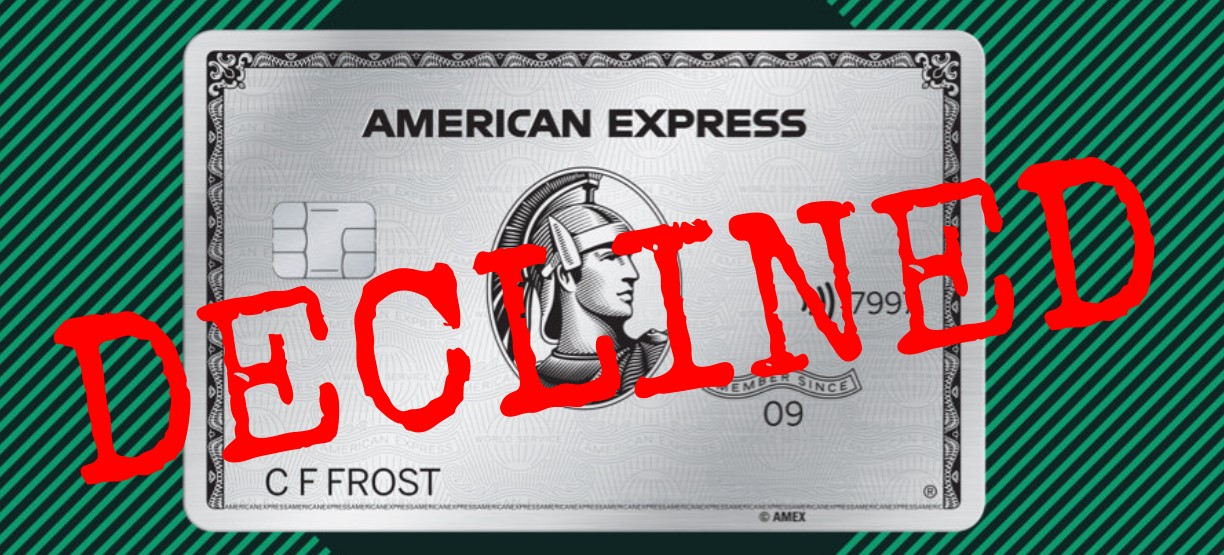
  • DWC CHANGES: Occasionally, the DWC will make a programming change without notifying filers.  The most recent example of this was when they stopped accepting American Express cards for lien filing fees.  Because we monitor filings so closely, we can quickly recognize these issues, and both share that information and fix those filings.

When you pair our error monitoring with our other filing efficiencies, you can image how much less time you spend filing through EDEXIS:

  • Unlimited simultaneous users that can file at the same time.
  • Automated mailed and emailed service to the other parties with a proof of service.
  • Automatically populated form data including all existing ADJ data.
  • Archived and updated forms and filing status including filing ID capture.
  • Automated Trial Exhibit Lists, and the ability to include a check and/or SASE with any mailing.
  • Automated NOR follow-up.

To learn more, please contact customer support at support@edexis.com or sign up online:

Automated NOR Report

If you have ever filed a Notice of Representation with the DWC, you know that the electronic filing triggers a manual review. Once the NOR is filed, your UAN has to be added to the case by a clerk. Thus, it is necessary to monitor your NORs to ensure that you are accurately being added to the address record. We have automated this monitoring process.

We can set your account up to automatically review NORs filed in the last 90 days and confirm that your UAN has been added to the address record. We will email you a report on the 3rd day of each month. This report meets the guidelines of the DWC’s process requiring you to send them a specifically formatted spreadsheet to request NOR follow-ups.

If you are interested, please contact customer support. We will start by running a full year report on your past NORs and then continue with the monthly report. There is no additional charge for this service.

Also, just a reminder that we can batch file your NOR’s for you when needed.

866-GET-EDEX

209-223-3461

support@edexis.com

andrea@edexis.com or julia@edexis.com

Easy Data Reports

Our EDEX data reporting features provide something for everyone. Select your REPORTS tab and then select the drop down menu. You can see a detailed explanation of what each report does. Here’s a little more guidance on those options:

FILING AND MAILING RELATED REPORTS

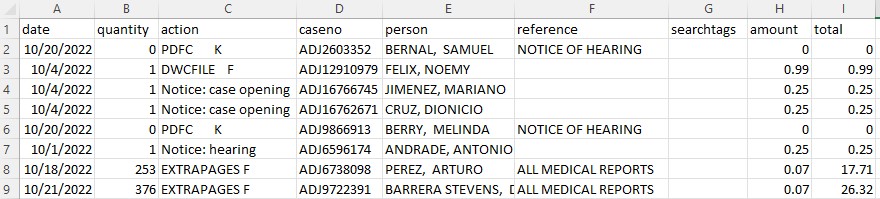
Filing History: Displays all filings and mailings including how many parties were served.

Mailing History: Displays the document title that was mailed with each recipient served and the total cost.

Invoice Details Report: All monthly charges are itemized individually. Reference fields can be associated.

Print and Delivery Certification Report: Review all of your mailings and their delivery status.

EDEX DATA REPORTS

Calendar (by receive date or hearing date): Quickly import your hearings into your internal calendar if you aren’t using the EDEXIS calendar.

Event: Capture all case events for faster review.

Case Opening: When a SSN or ERN watch is filed, it may eventually generate a notice of a case opening when a new ADJ case is created. This is also an automated feature when an Application of Adjudication is submitted via filing. Watches and subsequent case opening notices are an excellent tool for risk management and insurance providers.

Casewatch (without or without parties included): Quickly assess all cases you are tracking via casewatch.

Lien Payment: Audit your $150 lien fees against your credit card statement.

Liens vs. Casewatches: Never forget to file that casewatch. This report compares all of your filings to those cases you are tracking and alerts you to any missing casewatches. You can also email that report to support@edexis and we can batch process any missing casewatches. Casewatches provide hearings, events, and case party updates when a party changes and you DON’T have to be a case party.

Settlement Plus Report: Shows every case you have indicated an interest in via a search, casewatch, or filing and then the status of that case. This includes filings, hearings, settlement status, etc.

Report Tricks:

  • Some reports limit the time range available from the interface. If you need a larger date range, contact support and we will run that report for you.
  • When a report generates, it goes to your DocBox tab.
  • One report that isn’t available from the interface is the NOR REPORT. We can run this for you and quickly recognize if you have been added to the address record as a result of an NOR Filing.
  • There are no additional charges for reports.
  • Some reports can be automated to arrive in your email on your preferred schedule – daily, weekly, etc.
  • If you can’t find exactly what you are looking for, let us know!

EDEX Information Systems, Inc.

209-223-3461

866-Get-EDEX

California Judicial Council Proof of Service

Starting Monday, September 26th, you will notice a few changes to the usual flow of EDEX Mailing. The order of mailing steps is now different, but as you proceed you will still see the same familiar pages. We encourage you to click through the whole process to the end.

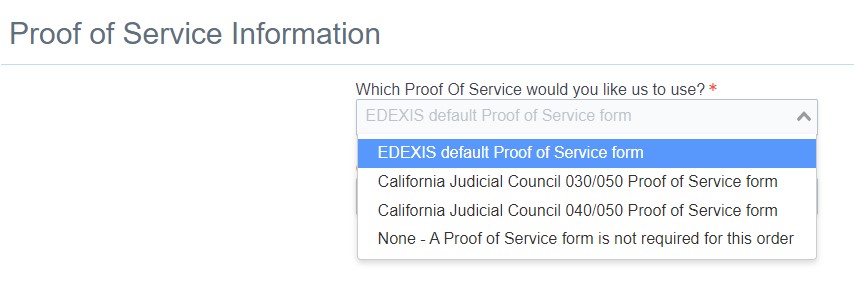
Modifications allowed the addition of two California Judicial Proofs of Service – both the 030/050 and 040/050. You still have the option to choose the EDEXIS proof of service or no proof of service as well. The EDEXIS proof of service now has a similar layout for consistent formatting across all of our proof of service templates.

Additional judicial proofs of service for other states are coming soon. Please reach out to us with your comments or requests, and as always, if you have any questions, don’t hesitate to contact us.

Thank you,

EDEX Information Systems, Inc.

209-223-3461 or 866-GET-EDEX

support@edexis.com

American Express Credit Cards No Longer Accepted by DWC

As of 09/02/2022, the California DWC stopped accepting American Express payments for the $150 lien filing fee. The DWC did not provide advanced notification of this new policy, and did not advertise the change in a DWC Newsline newsletter.

We recognized the problem over Labor Day weekend and were able to confirm the issue with the DWC administration. The DWC has not clarified the reason for the change or why no notification was provided.

We have contacted all affected parties that filed their liens via EDEXOne.

If you have any questions, please don’t hesitate to contact customer service at 209-223-3461.

EDEX Information Systems, Inc.

Reduce Your Mailing Costs by 33%

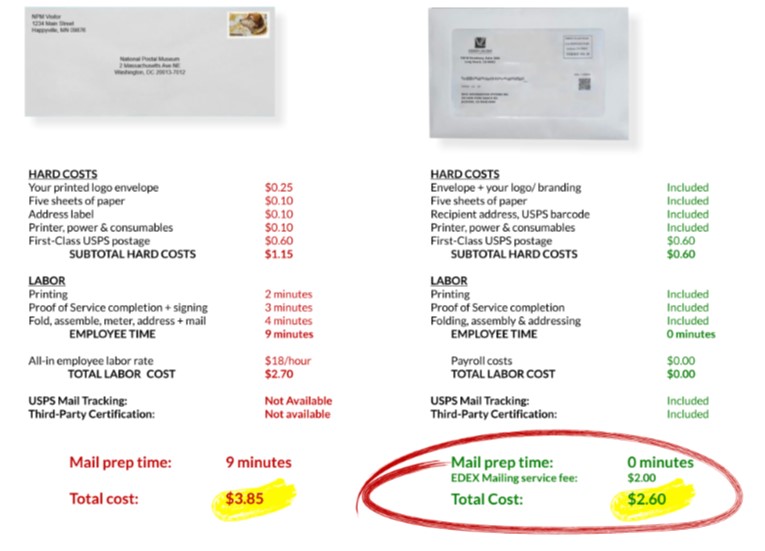
Do you know the true cost of processing mail in your office? Once you calculate time, paper, envelopes, printer consumables, and postage, an average envelope is at least $3.85. Mailing via EDEXIS includes all of those costs for only $2.60 – a 33% savings.

If you already have an EDEXIS account, you already have access to our mailing services. Mailing can be used in conjunction with an electronic EAMS filing or on its own to any destination. Contact us and request a $4.00 credit to try your first mailing. If you send us your logo, we can add that to your account and it will print on your outgoing, daily mail, envelope.

If you don’t have, or need, an EDEXIS full account, Mail Only accounts are available from an online sign up. There is no commitment and you simply pay as you go.

If you have any questions, please don’t hesitate to contact us.

EDEX Information Systems, Inc.

209-223-3461 or 866-GET-EDEX

andrea@edexis.com

julia@edexis.com

Automated DE-120 and DE-121 Probate Forms

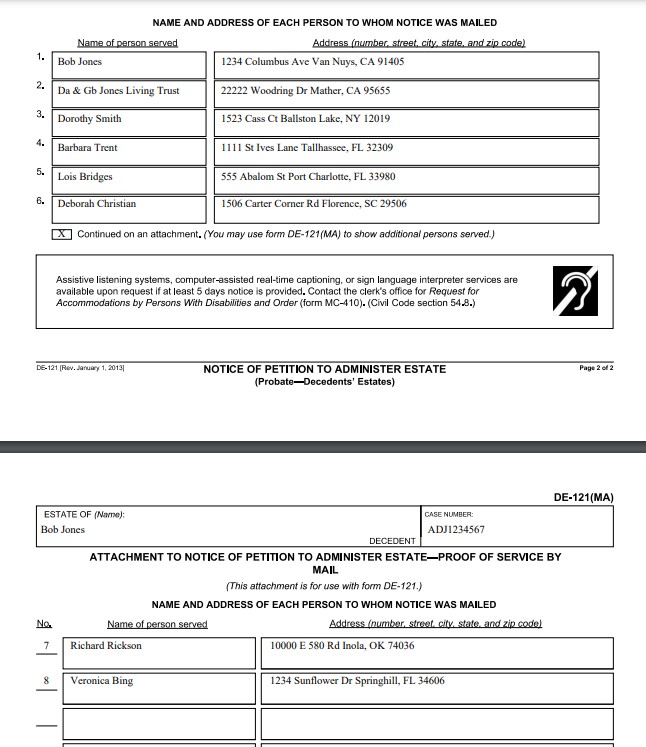
The DE-120 and DE-121 Probate forms have been automated within EDEXIS Mailing Services.

After entering prompted form information from the Universal Templates option, you can add the parties for service and the DE (MA) Proof of Service will be generated with the DE-120 or DE-121. We will then mail your documents and sign the proof of service.

Parties can be added individually or uploaded from a CSV file. If you use Clio or Casefriend, parties can be uploaded directly from these case management systems.

Mailing services include…

  • First Class, Certified, Certified Return Receipt, or Priority.
  • Email Delivery with confirmation of opened email.
  • All mail is trackable to varying degrees – even First Class.
  • Self addressed, stamped envelopes – pre-paid or not.
  • Check inclusion – Coming in late July.
  • Your logo included on all outgoing mail pieces.
  • Archived documents and party service status.
  • Delivery Certification.

You can sign up for a free trial account with no credit card required and no commitment. While our site is very intuitive, we are also happy to give you a guided webinar tour that takes about 10 – 15 minutes once you sign up. Free trial mailings do not include your company logo unless you request that feature first.

Please contact customer support for additional information. We look forward to chatting with you —

866-GET-EDEX

www.edexis.com

209-223-3461

EDEXIS Email Delivery with a Proof of Service

EDEXIS now offers delivery by email that includes the following features for .99 cents.

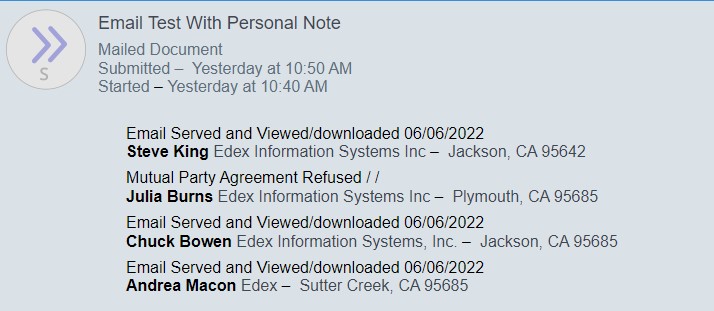
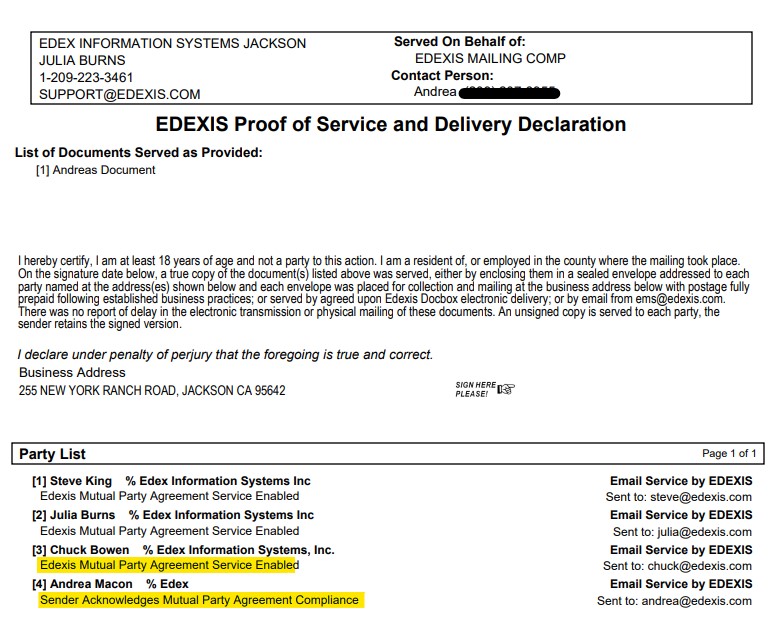
  1. Confirmation of Delivery: When your email is sent to the recipient, the status will be updated when that email is opened and viewed. In the sample below, you can see that three of the parties opened and downloaded their email. However, the fourth party, Julia Burns, refused the Mutual Party Agreement. What is a Mutual Party Agreement, you ask?

2. Automated Mutual Party Agreement: When serving legal documents, the recipient needs to agree to accept service via email from a specific sender. With every party you email, you have a choice to request an Automated Mutual Party Agreement. Once the recipient agrees to service, we then deliver the email. If the recipient refuses the service, we note that as well. If the recipient has already previously agreed to email service from you, you would simply not check the box requesting the Mutual Party Agreement. If a recipient refused delivery, you will receive an email with that notification. You can then go back to the mailing record, select the “Create Duplicate” option and serve that recipient by mail without having to recreate the packet.

3. Proof of Service: Like all of our delivery options, you can choose to include a proof of service with an email. Here is a sample of that proof of service. Once the confirmation of email receipt is received, the signed version of the proof of service is delivered to you via email (if set up) and is included with your archived document.

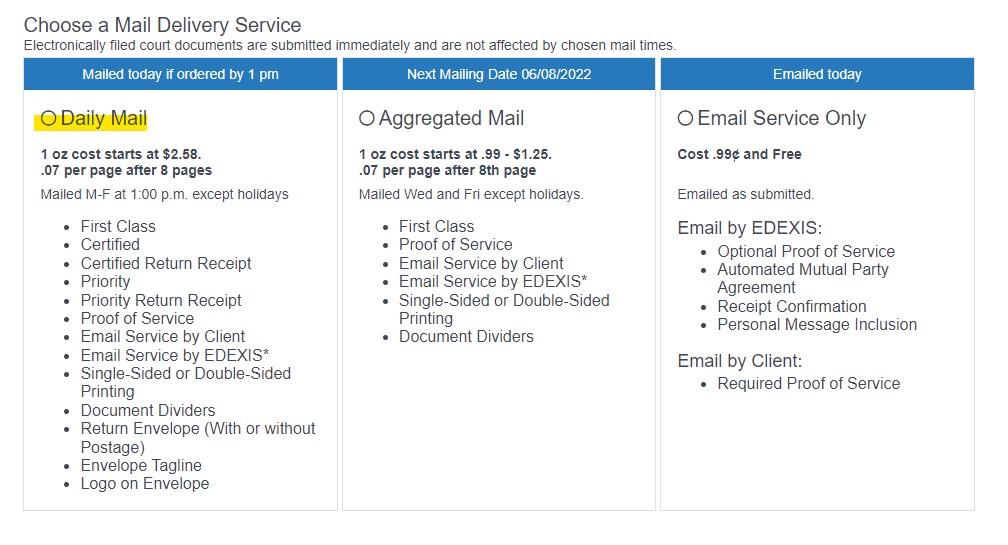
4. Combined Mailing Types: While the sample above shows four parties being served by email, you can select multiple mailing types. For example, if you are serving ten different parties and want two of them to receive Certified Mail, four to receive First Class, and four of them to be served via email, you can certainly do so. You would need to start the process from the “Daily Mail” option as shown below. If you want to combine email service with aggregated mail, you would need to start from the aggregated option.

5. Personal Note: When requesting delivery by email by EDEXIS, you can also include a personal note to the recipient. They will see this note before they open the email.

6. Email by Sender: There may be some instances where you want to email a document to the recipient yourself with a proof of service. You will also see that option for mailing. The proof of service notes that you are actually emailing the document, not us. There is no charge for this service and it does NOT include the features above.

As always, if you have any questions about these new features, please don’t hesitate to let us know. We look forward to hearing from you.

EDEX Information Systems, Inc.

209-223-3461

support@edexis.com, andrea@edexis.com, julia@edexis.com

New EDEXIS Mailing Interface

COMING NEXT WEEK — We will be introducing our updated mailing interface. You will access it from the Mailing Services tab in EDEXOne, but the flow will be a bit different. If you were previously using the attorneymailings.com site, you will be automatically redirected. Additionally, there will be new features included:

  • Email by EDEXIS. A few months ago we added the ability for YOU to generate a Proof of Service indicating that you were going to send service by email. Now, we also have the choice to have US email the document for you. The Proof of Service reflects this service. When we email a document on your behalf, the interface will note when the recipient has opened the email. Email delivery requires that the recipient agree to being served by that process. If you choose, our interface can now electronically confirm that the recipient accepts electronic service BEFORE we attempt to serve them – $0.99
  • Document Dividers. When a document is assembled for mailing, we can now insert a green separator sheet between each individual document. $1.25
  • Checks. Coming Soon — opt to include a check with a mailing – $1.25

We will still have all of the other services you have come to expect:

  • First Class, Certified, and Priority Mail (with automated status updates in your account)
  • Daily mail service sent out M-F at 1:00. If your mail is submitted before 1:00 it will go out the same day
  • Optional proof of service – FREE
  • Email service by user – FREE
  • Envelope Tagline – FREE
  • Your logo on the envelope – FREE
  • Mailing certification – FREE
  • Automated refund of Certified and Priority Mail if not delivered within 35 days – FREE
  • Return Envelope (with or without postage) – $1.25
  • Single-sided or double-sided printing.
  • Casefriend and Clio integration
  • The same affordable pricing. Aggregated mail starts at .99 up to 8 pages – $0.07 per page after. Daily mail (under 1oz) starts at $2.58

If you would like to schedule an online training of the new mailing interface, please don’t hesitate to let us know. As always, unlimited training is available for your account at no charge.

We appreciate your business and look forward to sharing these improvements.

EDEX Information Systems, Inc.

209-223-3461

866-Get-EDEX

www.edexis.com